How the binder scanner works: OCR, CLIP, Gemini and Scryfall
Loading cards by hand is the bottleneck of any trading app. If you have 1,000 cards in a binder, you're not going to sit and search them one by one. To use Natural Order's matching algorithm at all, your cards need to be digitized and indexed correctly. Apps that scan single cards one at a time exist (ManaBox is the well-known one), but we noticed that even with that tool, digitizing a full binder is painfully tedious. The intuitive answer: take photos of every page of a binder — the format most collectors and players actually use to store their collection — and feed them into a process that spits out the entire contents as a list. We looked for existing scanners that did this and found nothing useful. So we built it. Obviously it was a challenge — throwing the photo at a vision model and asking it to identify each card works in theory, but it's extremely slow and expensive. And we wanted this to be free, without spending a fortune on inference.
The full pipeline: from photo to result
Every binder photo goes through a multi-stage pipeline. The design prioritizes speed and accuracy: the cheapest, fastest techniques run first, and the expensive models only step in when strictly necessary.
- Upload and grid — The user uploads photos and adjusts the grid overlay
- Slot detection — The adaptive grid slices the image into individual cells
- Fast filters — Empty slots and card backs are dropped immediately
- Name OCR (EasyOCR) — Reads the card title text
- Scryfall resolution — 7 search strategies to find the exact card
- Collector number OCR — Reads the bottom strip to identify the printing
- CLIP for exact printing — Visually compares against every possible printing
- Gemini as a fallback — Only if the previous steps couldn't resolve the card
The adaptive grid: the decision that changed everything
Before the grid, the scanner tried to detect cards individually using contour detection — and it was a mess. Binder pocket edges were confused with card edges, reflections produced false positives, and dark cards against dark backgrounds were invisible. Accuracy was unacceptable.
The fix was radically simple: instead of trying to "find" cards in the image, we assume the structure of a binder is a grid. The user sees an interactive overlay on top of their photo and can adjust the grid lines to align with the pockets of their binder. It sounds like a minor detail, but this single change made the entire project viable.
On top of the base grid, the system applies an adaptive refinement with edge detection: it uses Sobel filters to detect real transitions between card and plastic, and nudges the grid divisions toward those edges. If the edge signal isn't reliable, it keeps the equal split. If the resulting cells are too uneven (ratio > 1.3x), it discards the adjustment and falls back to the base grid.
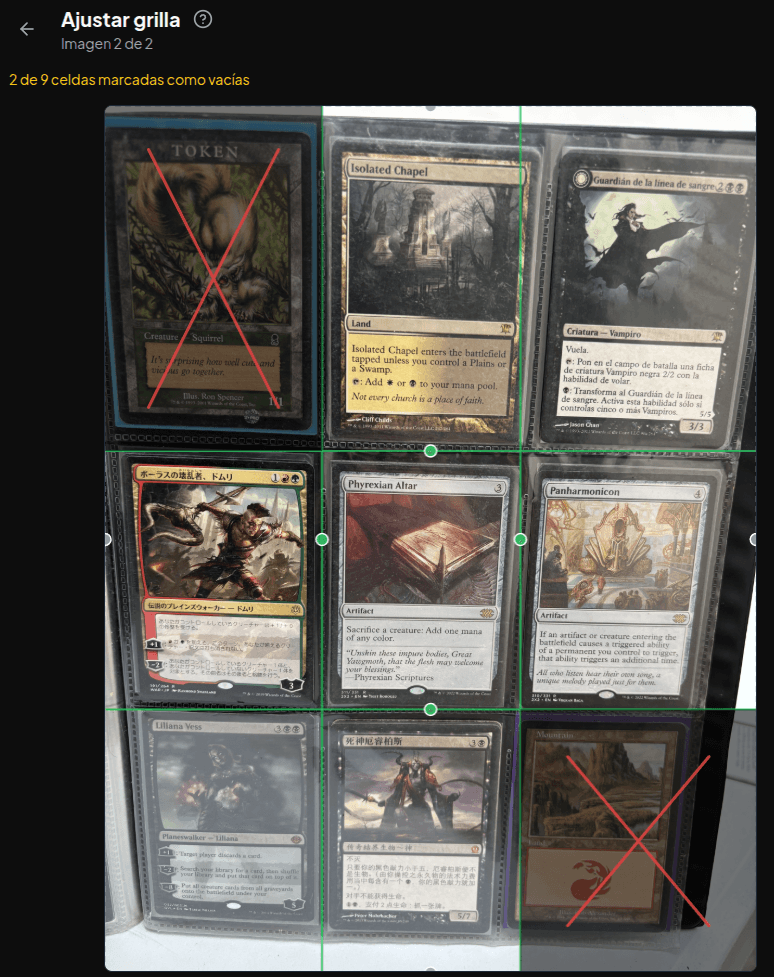
The user can also mark empty slots with a red X, saving unnecessary processing. All this configuration happens once per batch, and the coordinates are stored normalized (0.0 to 1.0), so they work the same regardless of image resolution.
Fast filters: discard before you process
Before spending resources on OCR or AI models, every cell goes through two ultra-fast filters:
- Empty detection — If the slot is marked empty by the user, it's skipped outright
- Card-back detection — A two-stage detector: first it analyzes the color histogram looking for the brown/blue ratio characteristic of the classic Magic card back (<1ms). If that passes, it's confirmed with a CLIP comparison against a reference embedding of the back (~50ms). Both stages must agree to avoid false positives with art that happens to share similar colors
These filters skip the entire OCR + CLIP + VLM pipeline for every empty or face-down slot. In a typical binder with some incomplete pages, that's a 10-20% saving on total time.
OCR: reading the card name
The heart of the scanner is EasyOCR, a Python OCR library that supports multiple languages. This matters: Magic cards are printed in English, Spanish, Japanese, Korean, Portuguese, and more. EasyOCR has a technical limitation where CJK languages (Japanese/Korean) are incompatible with Latin-script readers, so the scanner keeps multiple reader instances and tries each language group in turn.
Reading the name isn't trivial. The grid may slightly cut the card title, so the system tries progressively taller crops of the slot (18%, 25%, 35% of the cell height) and even extends the read above the grid edge to recover cut-off text. Before passing the image to OCR, it converts to grayscale and applies CLAHE (Contrast Limited Adaptive Histogram Equalization) to improve text contrast.
On top of the name, the scanner reads a second region: the bottom strip of the card, where the collector number and set code live (e.g., "183/249 MKM"). That information is critical for identifying the exact printing. The parser uses regex to detect patterns like "183/249" or concatenated digits, and applies fuzzy matching (Levenshtein distance) against known collector numbers in the database.
Name resolution: 7 strategies before giving up
OCR output isn't perfect. A "Lightning Bolt" can come back as "Lightming Bolt" or "Lightn1ng Bolt". The name resolution system has 7 cascading strategies, ordered cheapest to most expensive:
- Local exact match — Against a name index in ChromaDB
- Case-insensitive exact match — "lightning bolt" = "Lightning Bolt"
- Local fuzzy matching — Using rapidfuzz with a score ≥ 80
- Scryfall fuzzy API — Scryfall's approximate-search endpoint
- Scryfall by detected language — If OCR detected the card is in, say, Spanish, search the Spanish catalog
- Scryfall multilingual — Open search across all languages
- Gemini text-only correction — The OCR text (no image, minimal cost) is sent to Gemini to correct transcription errors, and steps 1-5 are retried
The system also detects the card's language by analyzing distinctive characters in the OCR output: ñ suggests Spanish, ã/õ Portuguese, è/ê French, etc. That lets the system point Scryfall at the right language catalog instead of searching blind.
Exact printing: collector number + CLIP
Once the name is resolved, we still need to know which printing it is. A Lightning Bolt has more than 50 distinct printings, each with different art, price, and set. The scanner combines two signals:
- Collector number — If the bottom-strip OCR read a valid collector number or set code, the candidates are filtered directly. If there's a single match, we skip CLIP entirely (~100ms saved per card)
- CLIP visual matching — A CLIP embedding (ViT-B-32) is generated from the cropped image and compared against pre-computed embeddings of every printing of that card in the database. The printing with the highest cosine similarity wins
This works well for art differences (an Alpha Lightning Bolt vs. a Masters 25 one), but it's less effective when the same art is reused across multiple sets. In those cases, the collector number is what actually breaks the tie.
Gemini: last resort, not first resort
A fundamental design decision: Gemini (Google's vision model) is the fallback, not the main pipeline. Each Gemini call with an image costs orders of magnitude more than a local lookup or a Scryfall query. In a 100-page binder with 9 cards per page, that scales fast.
Gemini only steps in when OCR + the 7 resolution strategies couldn't identify the card. And when it does, it does so carefully:
- It receives the cropped image and a prompt asking it to transcribe, not identify — we want it to read the visible text on the card, not guess from the artwork
- It's given the top 5 CLIP candidates as context, to reduce hallucinations
- Gemini's output runs through a validation chain: the name must exist in the local database (ChromaDB), then it's looked up against Scryfall. If the name can't be validated, it's flagged as a hallucination and discarded
In practice, fewer than 5% of cards need to go through Gemini. The OCR + Scryfall pipeline resolves the vast majority on its own.
Infrastructure: Modal, ChromaDB, and 2-second cold starts
The whole Python pipeline runs on Modal, a serverless computing platform that lets us define containers with heavy dependencies (PyTorch, EasyOCR, CLIP) and keep them "warm" via snapshots. A typical cold start is around 2 seconds instead of the 30+ it would take to spin everything up from scratch.
The card database is a ChromaDB index with pre-computed CLIP embeddings of all ~90,000 card printings on Scryfall. The index lives on a Modal persistent volume, so it isn't rebuilt on every run.
Every pipeline stage has timing instrumented (OCR, resolve, bottom OCR, CLIP, VLM) and stored as JSONB, so we can diagnose bottlenecks and keep optimizing. Processing a typical 9-card page takes ~40 seconds across all stages.
Results and review
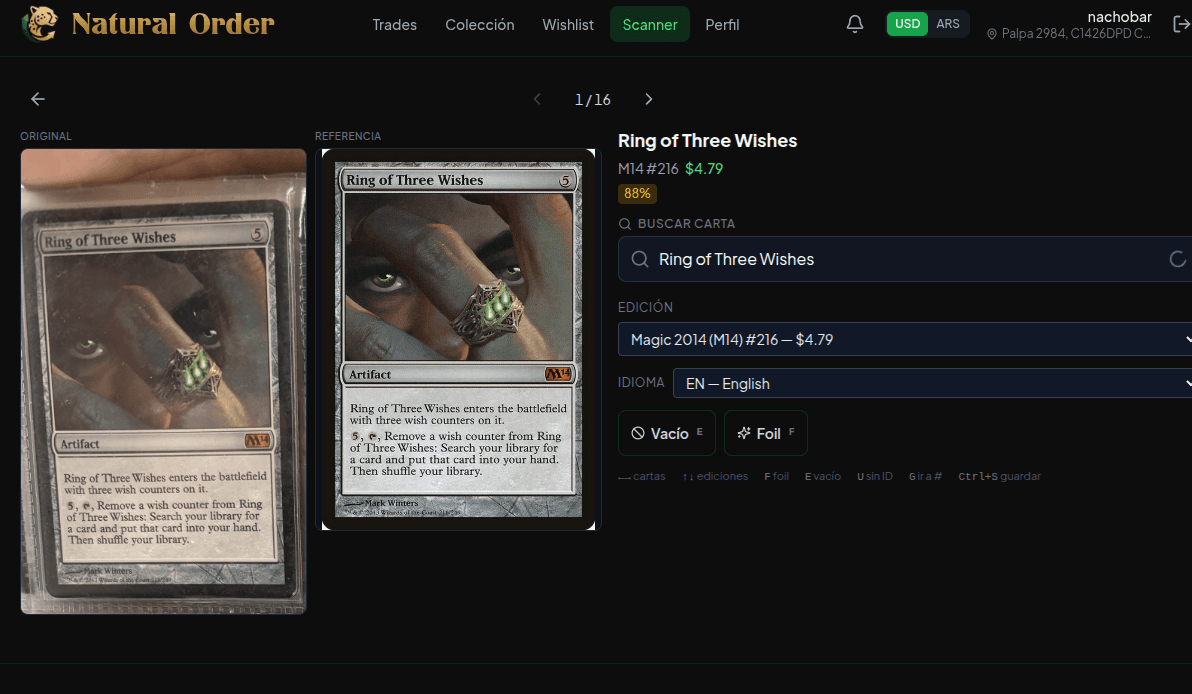
After processing, the user sees each identified card with its name, printing, image, and a confidence badge. If anything's off, they can search for the right card and replace it before importing. Corrected cards stay flagged so we can measure the real error rate and keep improving.
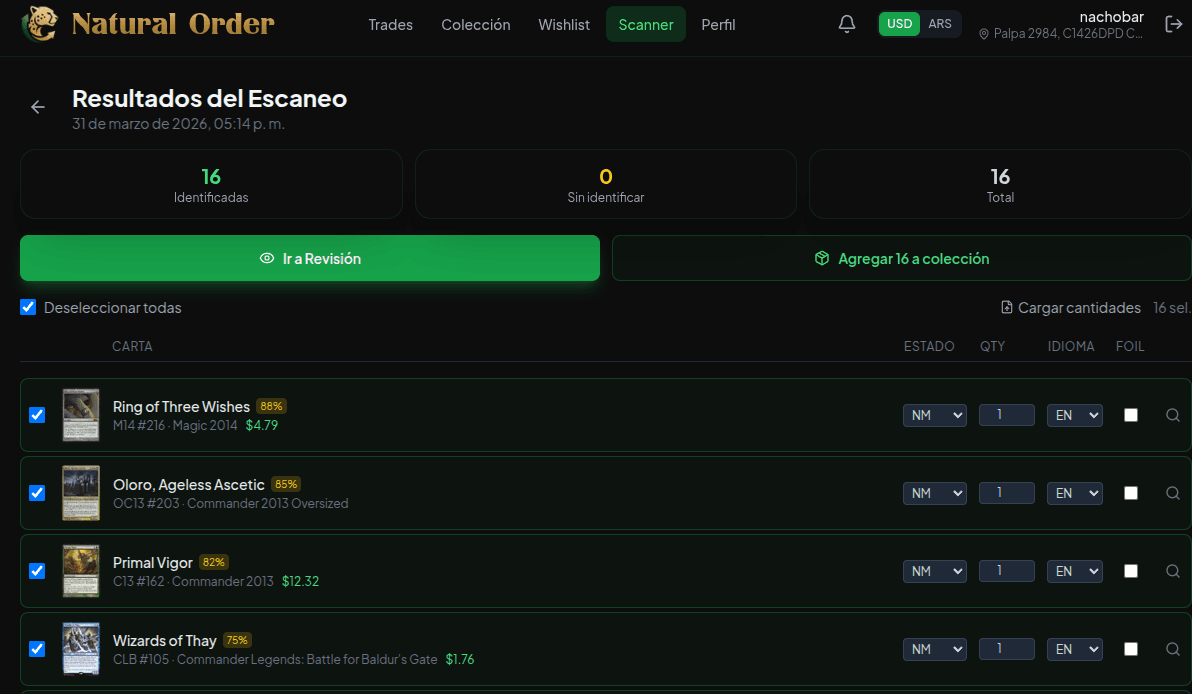
In the review view, the user can see each individual card from their binder photo and compare it against the card the model identified. There are also keyboard shortcuts to move and correct quickly: left/right to navigate between cards, up/down to change the printing, "F" to mark foil, "E" to mark empty. It's the fastest way to compare results and adjust whatever needs adjusting.
Once reviewed, the cards import directly into the collection or a bundle. No CSV, no copy-paste, no manual searches. From photo to trade in minutes.
The most accurate binder scanner around. And it's free
We haven't found another scanner that combines grid-based detection, multilingual OCR, 7-step Scryfall resolution, CLIP visual matching, and VLM validation. Most scanning apps process one card at a time. Our scanner processes whole pages.
The important part: it's free. There are no photo limits and no premium plan to unlock the scanner. If you have Magic cards in a binder, you can scan them right now.
And we keep improving. Every correction a user makes gives us data to refine the pipeline. Today's accuracy is better than last week's, and next week's will be better than today's.
Scan your binder now
Snap a photo of your binder and get your cards loaded in minutes. Free, no limits.
Create a free account